



Coming in BackupBuddy 3.1: New Features for Backup Destinations, Server Information and Settings
BackupBuddy 3.1 is on the way and we wanted to highlight a few features coming to users in this version update. In addition to BackupBuddy Stash, our very own online backup storage place, BackupBuddy 3.1 will also include numerous features and enhancements to backup destinations, server information and settings.

Backup Destinations
New remote destinations interface & design
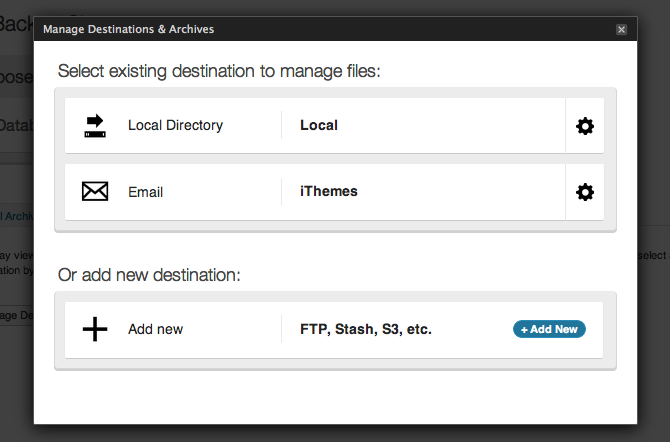 BackupBuddy’s interface for managing remote destinations for backups is about to get better with a nice, new look and more intuitive usability. Look for more features to existing destinations plus an untold amount of behind-the-scenes changes that improve user experience and open the door for cool future features.
Server Information
New database check and repair features to Server Info page
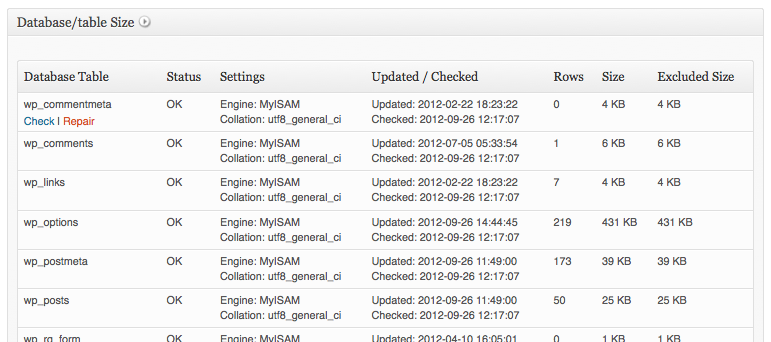 Sometimes things go wrong and your database gets corrupted. This often means having to use a web hosting tool or something like phpMyAdmin to attempt to repair it. BackupBuddy 3.1 will feature the option to test and run the MySQL command to perform a basic repair on database tables. This new feature will be available on the BackupBuddy Server Information page by hovering over a database table name in the list.
PHP Max Execution time tester (beta)
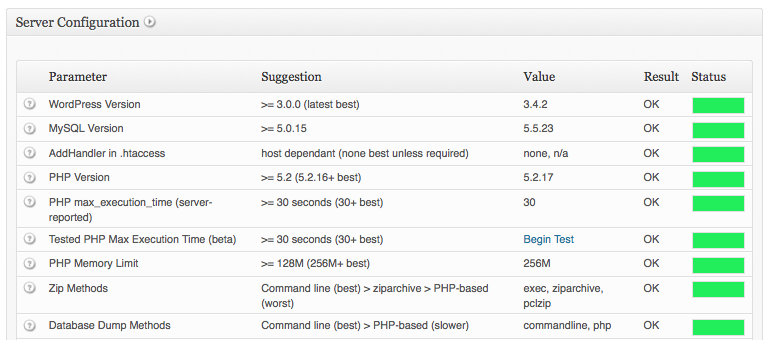 The new PHP Max Execution Time tester (beta) determines your ACTUAL maximum execution time limit of your server (usually shorter than what the server reports!) by running a script to keep track of the elapsed time. BackupBuddy attempts to override the execution time allowed to a very high number, but almost all hosts cap the number much lower — so the reported number can be far too high.
From the BackupBuddy’s Server Information page, Click “Begin Test” to initiate. When your browser stops loading this page, the script has most likely timed out at your actual PHP limit.
The new PHP Max Execution Time tester (beta) determines your ACTUAL maximum execution time limit of your server (usually shorter than what the server reports!) by running a script to keep track of the elapsed time. BackupBuddy attempts to override the execution time allowed to a very high number, but almost all hosts cap the number much lower — so the reported number can be far too high.
From the BackupBuddy’s Server Information page, Click “Begin Test” to initiate. When your browser stops loading this page, the script has most likely timed out at your actual PHP limit.
Settings
Exclude individual files (not just directories) from backups
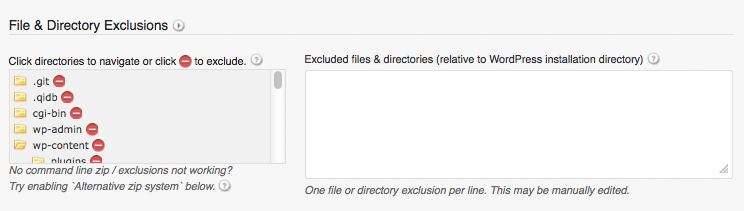 A few giant files clogging up your backups? BackupBuddy 3.1 will include a new option to exclude individual files (not just directories) from backups. Now listing files in exclusions navigator will be easier to exclude individual files.
Display the time in backup filenames in addition to the default date
Perform multiple backups per day? You’ll be able to include the time in the filename to more easily identify backups by time in addition to date. This works great combined with the Note feature.Extras
Error messages now highlighted in backup status for easier visibility
Easily see if anything may have gone wrong with error codes that link directly to their BackupBuddy Error Codes page for details.Backup download URL now included in scheduled backup success notifications
In BackupBuddy 3.1, you’ll be able to easily download completed scheduled backups from the notification email directly from the backup URL (if this feature is enabled in settings).Be on the lookout for the release of BackupBuddy 3.1 (plus BackupBuddy Stash) within the next few weeks, so follow @iThemes on Twitter for the latest news and updates.
Get BackupBuddy nowGet Release Notes for SolidWP products delivered right to your inbox.
Sign up
Join us for the next Solid Academy Webinar!
Free weekly webinars that will help you master WordPress and increase your business's bottom line.
What is a WordPress Phishing Attack?
Learn how to identify and prevent phishing attacks on WordPress websites.
Kiki SheldonWebsite Protection: 5 Ways to Keep Your Website Safe
Robust website protection is the shield that stands between your business and relentless cyber attacks. Prioritizing website protection enables businesses to fortify defenses to safeguard their online presence and preserve the trust of their customers in the face of ever-evolving cybersecurity threats.
Kiki Sheldon23 Ideas To Grow Your WordPress Business in 2023
WordPress is the most popular website-building platform worldwide, trusted by numerous brands. WordPress enables you to build a user-friendly and highly reliable site, together with tools and plugins to enhance your marketing and work like a lead magnet. All these features make WordPress the platform chosen by more than 43% of businesses globally.
SolidWP Editorial TeamSign up now — Get SolidWP updates and valuable content straight to your inbox
Sign up
Get started with confidence — risk free, guaranteed

